Vue3
1.Vite搭建Vue3项目
全局安装 Vite
npm install -g create-vite-app
使用 Vite 创建 Vue3 项目
create-vite-app vue3-vite
可以发现瞬间创建完成。
运行
cd vue3-vite
  npm install (or `yarn`)
  npm run dev (or `yarn dev`)
vite
冷服务
热更新
Rollup打包
2.从VUE2到VUE3
新特性
Composition API
通过创建 Vue 组件,我们可以将界面中重复的部分连同其功能一起提取为可重用的代码段。仅此一项就可以使我们的应用在可维护性和灵活性方面走得相当远。然而,我们的经验已经证明,光靠这一点可能并不够,尤其是当你的应用变得非常大的时候——想想几百个组件。处理这样的大型应用时,共享和重用代码变得尤为重要。
/*
 * @Author: kif kif101001000@163.com
 * @Date: 2022-05-31 17:22:40
 * @Last Modified by: kif kif101001000@163.com
 * @Last Modified time: 2022-05-31 17:27:05
 */
<template>
  <h1>{{ msg }}</h1>
  <!-- <button @click="count++">count is: {{ count }}</button> -->
  <p>
    Edit <code>components/HelloWorld.vue</code> to test hot module replacement.
  </p>

  <p>{{ data.counter }}</p>

</template>

<script>
import { reactive,computed } from "@vue/reactivity";
export default {
  name: "HelloWorld",
  props: {
    msg: String,
  },
  // data() {
  //   return {
  //     count: 0,
  //   };
  // },

  setup() {
    const data = reactive({
      counter: 1,
     doublecounter: computed(() => data.counter * 2)
    });
    return { data };

  },

};
</script>
setup等同于原data,通过reactive定义变量病赋值到data,再return出去,就可以在template用双大括号使用,计算特性:doublecounter的定义,注意需要import computed
注意:setup里面没有beforecreate和created两个,最早的是onMounted这个钩子
单值变量 ref()
/*
 * @Author: kif kif101001000@163.com
 * @Date: 2022-05-31 17:22:40
 * @Last Modified by: kif kif101001000@163.com
 * @Last Modified time: 2022-05-31 17:27:05
 */
<script>
import { ref } from 'vue'

export default {
  name: 'HelloWorld',
  props: {
    msg: String,
  },
  // data() {
  //   return {
  //     count: 0,
  //   };
  // },

  setup() {
    const msg2 = ref('some massage')

    return { msg2 }
  },
}
</script>

<template>
  <h1>{{ msg }}</h1>
  <!-- <button @click="count++">count is: {{ count }}</button> -->
  <p>
    Edit <code>components/HelloWorld.vue</code> to test hot module replacement.
  </p>

  <p>{{ msg2 }}</p>
</template>
还可以将整个counter的部分提出来
/*
 * @Author: kif kif101001000@163.com
 * @Date: 2022-05-31 17:22:40
 * @Last Modified by: kif kif101001000@163.com
 * @Last Modified time: 2022-05-31 17:27:05
 */
<script>
import { computed, reactive, ref } from 'vue'

export default {
  name: 'HelloWorld',
  props: {
    msg: String,
  },

  setup() {
    const data = userCounter()
    return { data }
  },
}
function userCounter() {
  const data = reactive({
    counter: 1,
    doublecounter: computed(() => data.counter * 2),
  })

  return data
}
</script>

<template>
  <h1>{{ msg }}</h1>
  <!-- <button @click="count++">count is: {{ count }}</button> -->
  <p>
    Edit <code>components/HelloWorld.vue</code> to test hot module replacement.
  </p>

  <p>{{ data.counter }}</p>
  <p>{{ data.doublecounter }}</p>
</template>
导出的data可以解构出来,就不用在页面上使用多个data.
/*
 * @Author: kif kif101001000@163.com
 * @Date: 2022-05-31 17:22:40
 * @Last Modified by: kif kif101001000@163.com
 * @Last Modified time: 2022-05-31 17:27:05
 */
<script>
import { computed, reactive, ref, toRefs } from 'vue'

export default {
  name: 'HelloWorld',
  props: {
    msg: String,
  },

  setup() {
    const { counter, doublecounter } = userCounter()

    return { counter, doublecounter }
  },
}
function userCounter() {
  const data = reactive({
    counter: 1,
    doublecounter: computed(() => data.counter * 2),
  })

  return toRefs(data)
}
</script>

<template>
  <h1>{{ msg }}</h1>
  <!-- <button @click="count++">count is: {{ count }}</button> -->
  <p>
    Edit <code>components/HelloWorld.vue</code> to test hot module replacement.
  </p>

  <p>{{ counter }}</p>
  <p>{{ doublecounter }}</p>
</template>
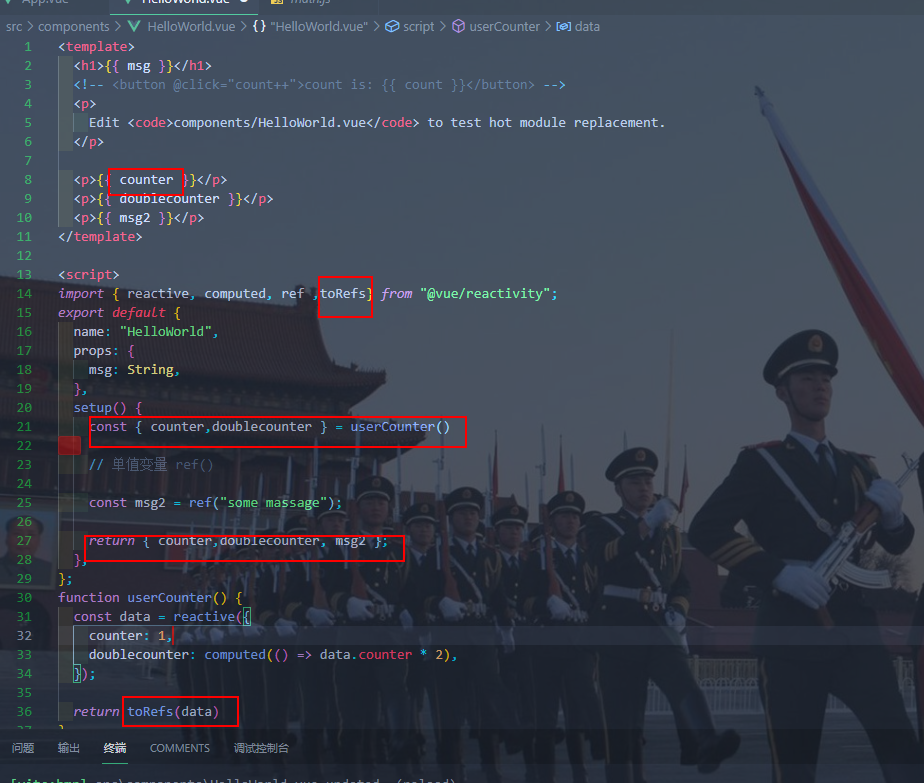
元素引用
通过给元素制定属性,如
<p ref="desc"></p>
再用单值定义为null,该单值就可以作为元素
/*
 * @Author: kif kif101001000@163.com
 * @Date: 2022-05-31 17:22:40
 * @Last Modified by: kif kif101001000@163.com
 * @Last Modified time: 2022-05-31 17:27:05
 */
<script>
import { computed, reactive, ref, toRefs } from 'vue'

export default {
  name: 'HelloWorld',
  props: {
    msg: String,
  },
  setup() {
    // 元素引用
    const desc = ref(null)
    return { desc }
  },
}
</script>

<template>
  <p ref="desc" />
</template>
此时desc可操作元素
如通过输入框改变变量值,在监听该变量,变量改变就使p的内容也改变
Teleport
制定内容的父元素
a.vue
/*
 * @Author: kif kif101001000@163.com
 * @Date: 2022-05-31 17:22:40
 * @Last Modified by: kif kif101001000@163.com
 * @Last Modified time: 2022-05-31 17:27:05
 */
<script>
import modalButton from './modalButton.vue'

export default {
  name: 'HelloWorld',
  components: {
    ModalButton: modalButton
  },
  props: {
    msg: String,
  },
  setup() {

  },
}
</script>

<template>
  <!-- teleprot -->
  <ModalButton />
</template>
b.vue
/*
 * @Author: kif kif101001000@163.com
 * @Date: 2022-05-31 17:22:40
 * @Last Modified by: kif kif101001000@163.com
 * @Last Modified time: 2022-05-31 17:27:05
 */
<script>
export default {
  components: {},
  props: {},
  data() {
    return { modalOpen: false }
  },
  methods: {},
}
</script>

<template>
  <div>
    <button @click="modalOpen = true">
      弹出
    </button>
    <teleport to="body">
      <div v-if="modalOpen">
        <div>
          kif
          <button @click="modalOpen = false">
            关闭
          </button>
        </div>
      </div>
    </teleport>
  </div>
</template>

<style lang="less" scoped>
</style>
<teleport to="body">
指定弹出框父级元素为body
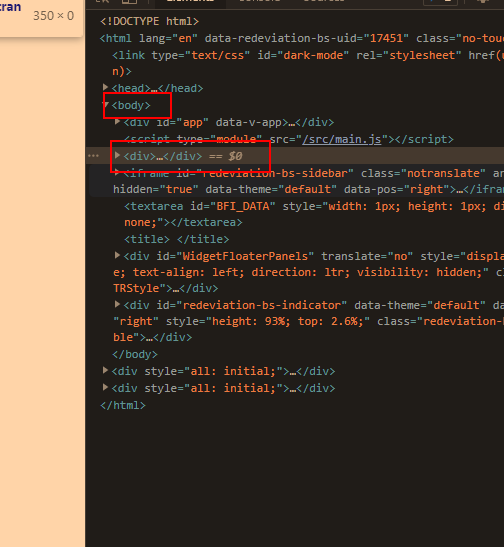
Emits Components Option
值得注意的新特性
Vue 3 中一些需要关注的新功能包括:
- 组合式 API https://v3.cn.vuejs.org/guide/composition-api-introduction.html
- Teleport https://v3.cn.vuejs.org/guide/teleport.html
- 片段 https://v3.cn.vuejs.org/guide/migration/fragments.html
- 触发组件选项 https://v3.cn.vuejs.org/guide/component-custom-events.html
- 来自
@vue/runtime-core的createRendererAPI ,用于创建自定义渲染器 - 单文件组件组合式 API 语法糖 (``) https://v3.cn.vuejs.org/api/sfc-script-setup.html
- 单文件组件状态驱动的 CSS 变量 (`` 中的
v-bind) https://v3.cn.vuejs.org/api/sfc-style.html#%E7%8A%B6%E6%80%81%E9%A9%B1%E5%8A%A8%E7%9A%84%E5%8A%A8%E6%80%81-css - SFC `` 现在可以包含全局规则或只针对插槽内容的规则 https://github.com/vuejs/rfcs/blob/master/active-rfcs/0023-scoped-styles-changes.md

- Suspense https://v3.cn.vuejs.org/guide/migration/suspense.html
重写双向绑定
vue2基于Object.defineProperty()实现
Vue3基于Proxy(ES6新增)实现
优势:
- 丢掉麻烦的备份数据
- 省去for in循环
- 可以监听到数组变化(包括push等操作)
优化Vdom
vue2中,每次更新diff,都是全量对比,性能消耗大,
vue3,只对比带有标记的内容
https://template-explorer.vuejs.org/

图中标记item 1 text
fragment
vue3允许多个template根节点
Tree shaking
保持项目结果不变的条件下,去除无用的代码
vue指令补充
  <div class="kif" @click="parend">
    <div class="text" v-if="flag" v-text="message">
</div>

    <button @click.stop="fun2">
on
</button>
  </div>
@click.stop阻止冒泡
@click.prevent 阻止事件的默认行为,
@keyup.enter
3.ref
3.1 ref
用途:
接受一个参数值并返回一个响应式且可改变的 ref 对象。ref 对象拥有一个指向内部值的单一属性 .value。实现修改ref.value页面响应式变化
导入:
import { ref } from 'vue'
/*
 * @Author: kif kif101001000@163.com
 * @Date: 2022-05-31 17:22:40
 * @Last Modified by: kif kif101001000@163.com
 * @Last Modified time: 2022-05-31 17:27:05
 */
<script setup lang="ts">
import { ref } from 'vue'

let count = ref(0)

let change = () => {
  count.value++
  console.log(count)
}
</script>

<template>
  <h1>{{ count }}</h1>
  <button @click="change">
    change
  </button>
</template>

<style scoped>
</style>
Ref
ts中用来定义变量类型
import { ref,Ref } from 'vue'

let count:Ref<number> = ref(0)
3.2 isref
用途:判断是否是一个REF对象
导入:
import { isRef, ref } from 'vue'
/*
 * @Author: kif kif101001000@163.com
 * @Date: 2022-05-31 17:22:40
 * @Last Modified by: kif kif101001000@163.com
 * @Last Modified time: 2022-05-31 17:27:05
 */
import { ref,isRef,Ref } from 'vue'

defineProps<{ msg: string }>()

let count:Ref<number> = ref(0)

let s:string='kif'
console.log(isRef(s)) //false
console.log(isRef(count))//true
3.3 shallowRef,triggerRef
用途:配合使用形成响应式引用数据类型
导入:
/*
 * @Author: kif kif101001000@163.com
 * @Date: 2022-05-31 17:22:40
 * @Last Modified by: kif kif101001000@163.com
 * @Last Modified time: 2022-05-31 17:27:05
 */
<script setup lang="ts">
import { shallowRef, triggerRef } from 'vue'

let obj = {
  name: 'kif',
  age: 12
}
let objRef = shallowRef(obj)
let change2 = () => {
  objRef.value.age = 34
  console.log(objRef)
}
</script>

<template>
  <p>{{ objRef }}</p>
  <button @click="change2">
    change2
  </button>
</template>

<style scoped>
</style>

仅仅使用shallowRef无法实现对对象属性的响应式改变(objRef.value.age=34),可以使用的解决办法:
改变整个value
jsobjRef.value = { name: 'kif', age: 45 }triggerRef强制更新视图
jsobjRef.value.age = 45 triggerRef(objRef)
3.4 customRef
自定义Ref
有点难,先不学,嘿嘿嘿
4.reactive
4.1 reactive
用途:接收一个普通对象然后返回该普通对象的响应式代理。等同于 2.x 的 Vue.observable()
接受复杂数据类型,如数组,对象
ps:前面ref在接受复杂数据类型后内部处理其实是用的reactive
导入:
import { reactive } from 'vue'
/*
 * @Author: kif kif101001000@163.com
 * @Date: 2022-05-31 17:22:40
 * @Last Modified by: kif kif101001000@163.com
 * @Last Modified time: 2022-05-31 17:27:05
 */
<script setup lang="ts">
import { reactive } from 'vue';
let obj= reactive({
    msg:'hello'
})
let change=()=>{
    obj.msg='world'
}
</script>
<template>
    {{ obj }}
    <button @click="change">button</button>
</template>
<style scoped>
</style>
reactive不用value获取值
注:数组时需要注意!
/*
 * @Author: kif kif101001000@163.com
 * @Date: 2022-05-31 17:22:40
 * @Last Modified by: kif kif101001000@163.com
 * @Last Modified time: 2022-05-31 17:27:05
 */
<script setup lang="ts">

import { reactive } from 'vue';

let arrReactive=reactive([1,2,3])
let change2=()=>{
    arrReactive[1]=2
}

</script>

<template>

    {{ arrReactive }}
    <button @click="change2">button</button>

</template>
<style scoped>
</style>
arrReactive[1]=2这种数组操作不能用,只能用push,
let change2 = () => {
  let newArr = [4, 5, 7, 8]

  arrReactive.push(...newArr)
}
way2: 创建一个响应式对象,对象的属性是数组
/*
 * @Author: kif kif101001000@163.com
 * @Date: 2022-05-31 17:22:40
 * @Last Modified by: kif kif101001000@163.com
 * @Last Modified time: 2022-05-31 17:27:05
 */
<script setup lang="ts">

import { reactive } from 'vue';

type T = {
    list: number[]
}
let obj2: T = reactive<T>({
    list: [1, 2, 3]
})

let change3 = () => {
    let newarr = [1, 2, 3, 4, 5, 6, 7]
    obj2.list = newarr
}

</script>

<template>

    {{ obj2.list }}
    <button @click="change3">button</button>

</template>
<style scoped>
</style>
4.2 readonly
用途:拷贝一份reactive对象并设置为只读
导入:
import { readonly } from 'vue'
/*
 * @Author: kif kif101001000@163.com
 * @Date: 2022-05-31 17:22:40
 * @Last Modified by: kif kif101001000@163.com
 * @Last Modified time: 2022-05-31 17:27:05
 */
<script setup lang="ts">
import { reactive,readonly } from 'vue';
let obj = reactive({
    msg: 'hello'
})
let change = () => {
    obj.msg = 'world'
}
// readonly
let copyObj=readonly(obj)
copyObj.msg='world'
</script>

4.3 shallowReactive
用途:将对象第一层设置为响应式
导入:
import { shallowReactive } from 'vue'
/*
 * @Author: kif kif101001000@163.com
 * @Date: 2022-05-31 17:22:40
 * @Last Modified by: kif kif101001000@163.com
 * @Last Modified time: 2022-05-31 17:27:05
 */
<script setup lang="ts">

import { shallowReactive } from 'vue';

let deepObjShall=shallowReactive({
    name:'kif',
    firends:{
        name:'zm',
        age:22
    }
})
let changeS=()=>{
    deepObjShall.name='kif2'
}
let changeS2=()=>{
    deepObjShall.firends.age=11
}
//changeS()
//changeS2()
</script>

<template>

    {{ deepObjShall }}
      <button @click="changeS">button</button>
    <button @click="changeS2">button</button>

</template>
<style scoped>
</style>
changeS() changeS2()
这样执行会发现深浅都会变化,正确使用方法是用事件触发

5.to http://5.to 
5.1 toRef
用途:将对象某一个属性变成响应式
导入:
import { toRef } from 'vue'
/*
 * @Author: kif kif101001000@163.com
 * @Date: 2022-05-31 17:22:40
 * @Last Modified by: kif kif101001000@163.com
 * @Last Modified time: 2022-05-31 17:27:05
 */
<script setup lang="ts">
import { toRef } from 'vue'

let obj = {
  name: 'kif',
  age: 13
}

let tR = toRef(obj, 'age')

let change = () => {
  tR.value++
  console.log('原', obj)
  console.log('引', tR)
}
</script>

<template>
  <!-- <h1>{{ msg }}</h1> -->
  <p>{{ tR }}</p>
  <button @click="change">
    dianji
  </button>
</template>

<style scoped>
</style>
点击之后原对象和新对象都会变,而且页面不会响应式刷新

原对象是响应式就可以响应式变化
即:
let obj = reactive({
  name: 'kif',
  age: 13
})
5.2 torefs
用途:对象解构后每个属性变成响应式
导入:
import { toRefs } from 'vue'
let { name, age } = reactive({
  name: 'kif',
  age: 13
})
这种解构后的name 和age不是响应式的,
/*
 * @Author: kif kif101001000@163.com
 * @Date: 2022-05-31 17:22:40
 * @Last Modified by: kif kif101001000@163.com
 * @Last Modified time: 2022-05-31 17:27:05
 */
<script setup lang="ts">
import { reactive, toRefs } from 'vue'

let { name, age } = toRefs(reactive({
  name: 'kif',
  age: 13
}))

let change2 = () => {
  age.value++
}
</script>

<template>
  <!-- <h1>{{ msg }}</h1> -->
  <p>{{ age }}</p>
  <button @click="change2">
    dianji
  </button>
</template>

<style scoped>
</style>
5.3 toRaw
用途:将响应式对象变回普通对象
导入:
import { toRew } from 'vue'
6.计算属性 computed
用途:
导入:
import { computed } from 'vue'
/*
 * @Author: kif kif101001000@163.com
 * @Date: 2022-05-31 17:22:40
 * @Last Modified by: kif kif101001000@163.com
 * @Last Modified time: 2022-05-31 17:27:05
 */
<script setup lang="ts">
import { computed, ref } from 'vue'

let firstName = ref('')
let lastName = ref('')
let fullName = computed(() => {
  return `${firstName.value} ${lastName.value}`
})
// let fullName2 = computed({
//     set() {

//         firstName.value + lastName.value

//     },
//     get() {
//         return `${firstName.value} ${lastName.value}`
//     }
// })
</script>

<template>
  input:<input v-model="firstName"><br>
  input:<input v-model="lastName"><br>
  <p>{{ fullName }}</p>
</template>

<style scoped>
</style>
案例:购物车
/*
 * @Author: kif kif101001000@163.com
 * @Date: 2022-05-31 17:22:40
 * @Last Modified by: kif kif101001000@163.com
 * @Last Modified time: 2022-05-31 17:27:05
 */
<script setup lang="ts">
import { computed, reactive } from 'vue'

interface goods {
  name: string
  num: number
  price: number
}

let data = reactive<goods[]>([
  {
    name: 'goods1',
    num: 1,
    price: 12
  },
  {
    name: 'goods2',
    num: 2,
    price: 13
  },
  {
    name: 'goods3',
    num: 2,
    price: 14
  }
])
let add = (index: number) => {
  data[index].num++
}
let reduce = (index: number) => {
  if (data[index].num > 0) {
    data[index].num--
  }
}
let deleteDo = (index: number) => {
  data.splice(index, 1)
}
let sum = computed(() => {
  let sum = 0
  data.forEach((item) => {
    sum += item.num * item.price
  })
  return sum
})
</script>

<template>
  <dvi class="main">
    <table border style="width:800px">
      <thead>
        <tr align="center">
          <th>序号</th>
          <th>名称</th>
          <th>数量</th>
          <th>单价</th>
          <th>操作</th>
        </tr>
      </thead>
      <tbody>
        <tr v-for="(item, index) in data">
          <td>{{ index }}</td>
          <td>{{ item.name }}</td>
          <td>
            <button @click="add(index)">
              +
            </button>{{ item.num }}<button @click="reduce(index)">
              -
            </button>
          </td>
          <td>{{ item.price }}</td>
          <td>
            <button @click="deleteDo(index)">
              delete
            </button>
          </td>
        </tr>
        <tr>
          <td />
          <td />
          <td />
          <td />
          <td>sum:{{ sum }}</td>
        </tr>
      </tbody>
      <tfoot />
    </table>
  </dvi>
</template>

<style scoped>
</style>

7.监听属性 watch
导入:
import { watch } from 'vue'
/*
 * @Author: kif kif101001000@163.com
 * @Date: 2022-05-31 17:22:40
 * @Last Modified by: kif kif101001000@163.com
 * @Last Modified time: 2022-05-31 17:27:05
 */
<script setup lang="ts">
import { ref, watch } from 'vue'

let me1 = ref('')
let me2 = ref('')
watch([me1, me2], (newVal, oldVal) => {
  console.log(newVal, oldVal)
})
</script>

<template>
  watch
  <input v-model="me1">
  <input v-model="me2">
</template>

<style scoped>
</style>
深度监听:
watch(obj, (newVal, oldVal) => {
  console.log(newVal, oldVal)
}, {
  deep: true
})
高级监听器 watchEffect
/*
 * @Author: kif kif101001000@163.com
 * @Date: 2022-05-31 17:22:40
 * @Last Modified by: kif kif101001000@163.com
 * @Last Modified time: 2022-05-31 18:09:58
 */
<script setup lang="ts">
import { ref, watchEffect } from 'vue'

let messag2 = ref('')

watchEffect(() => {
  console.log(messag2.value)
})
</script>

<template>
  watch
  <input v-model="messag2">
</template>

<style scoped>
</style>
watchEffect(()=>{ console.log(messag2.value) })
可以传入一个回调函数作为参数,这个回调函数会在里面代码优先执行
/*
 * @Author: kif kif101001000@163.com
 * @Date: 2022-05-31 17:22:40
 * @Last Modified by: kif kif101001000@163.com
 * @Last Modified time: 2022-05-31 18:13:05
 */
<script setup lang="ts">

import { watch, ref, reactive, watchEffect } from 'vue'

let messag2 = ref('')

watchEffect((fun) => {

    console.log(messag2.value)
    fun(() => {
        console.log('before')
    })
})

</script>

<template>
    watch
    <input v-model="messag2" />
</template>
<style scoped>
</style>

其返回值是一个函数,执行即可停止监听
let stop = watchEffect((fun) => {

    console.log(messag2.value)
    fun(() => {
        console.log('before')
    })
})
stop()
8.组件和生命周期
8.1组件
每一个.vue文件即为一个组件,通过在script里面
import x from ''
引入,组件可以复用,但引入名不能和html原标签名相同。
8.2组件生命周期
8.2.1 onBrforeMount
挂载之前
此时无法获取到dom元素
/*
 * @Author: kif kif101001000@163.com
 * @Date: 2022-06-01 09:53:54
 * @Last Modified by:   kif kif101001000@163.com
 * @Last Modified time: 2022-06-01 09:53:54
 */
<script setup lang="ts">
import { onBeforeMount } from 'vue'

console.log('正常')// 正常

onBeforeMount(() => {
  let div = document.getElementsByClassName('main')[0]
  console.log(div)// undefined
  console.log('onBeforeMount')// onBeforeMount
})
</script>

<template>
  <div class="main">
    k
  </div>
</template>

<style scoped>
</style>

8.2.2 onMounted
挂载之后,可以拿到dom元素
/*
 * @Author: kif kif101001000@163.com
 * @Date: 2022-06-01 09:53:54
 * @Last Modified by: kif kif101001000@163.com
 * @Last Modified time: 2022-06-01 09:56:46
 */
<script setup lang="ts">
import { onBeforeMount, onMounted } from 'vue'

console.log('正常')

onBeforeMount(() => {
  let div = document.getElementsByClassName('main')[0]
  console.log(div)
  console.log('onBeforeMount')
})
onMounted(() => {
  let div = document.getElementsByClassName('main')[0]
  console.log(div)
  console.log('onMounted')
})
</script>

<template>
  <div class="main">
    k
  </div>
</template>

<style scoped>
</style>

8.2.3 onBeforeUpdate
更新之前
8.2.4 onUpdated
更新之后
8.2.5 onbeforeUnmount
卸载之前
8.2.6 onUnmount
卸载完成
v-if 会触发卸载加载事件,可以用来演示
9.组件传值
案例:常规页面布局
layout.vue:
<script setup lang="ts">
import Content from './content/index.vue'
import Header from './header/index.vue'
import Menu from './menu/index.vue'
</script>

<template>
  <div class="main">
    <Menu />
    <div class="main-right">
      <Header />
      <Content />
    </div>
  </div>
</template>

<style lang="less" scoped>
.main {
    display: flex;
    overflow: hidden;
    .menu {
        width: 200px;
    }

    &-right {
        flex: 1;
        border: 1px solid blue;
        display: flex;
        flex-direction: column;
    }
}
</style>
content.vue
<script setup lang="ts">
import { ref } from 'vue'
</script>

<template>
  <div class="content">
    content
    <div v-for="item in 100" :key="item" class="list">
      {{ item }}
    </div>
  </div>
</template>

<style  scoped>
.content {
    /* height: 100px; */
    flex: 1;
    overflow: auto;
    border: 2px solid green;
    padding: 20px;
}
</style>
header.vue
<script setup lang="ts">
import { ref } from 'vue'
</script>

<template>
  <div class="header">
    header
  </div>
</template>

<style scoped>
.header{
    /* flex:1 */
    height:100px
}
</style>
menu.vue
<script setup lang="ts">
import Content from './content/index.vue'
import Header from './header/index.vue'
import Menu from './menu/index.vue'
</script>

<template>
  <div class="main">
    <Menu />
    <div class="main-right">
      <Header />
      <Content />
    </div>
  </div>
</template>

<style lang="less" scoped>
.main {
    display: flex;
    overflow: hidden;
    .menu {
        width: 200px;
    }

    &-right {
        flex: 1;
        border: 1px solid blue;
        display: flex;
        flex-direction: column;
    }
}
</style>
9.1 defineProps
父组件向子组件传值
简单数据类型
父组件:
<Menu title="this is title"></Menu>
title为参数量名
子组件:
/*
 * @Author: kif kif101001000@163.com
 * @Date: 2022-06-01 14:03:10
 * @Last Modified by:   kif kif101001000@163.com
 * @Last Modified time: 2022-06-01 14:03:10
 */
<script setup lang="ts">
interface Props {
  title: string
}
defineProps<Props>()
</script>

<template>
  <div class="menu">
    menu
    {{ title }}
  </div>
</template>

<style lang='less' scoped>
</style>
type Props = {
    title: string
}
定义了参数类型,defineProps接受参数,就可以直接使用
复杂数据类型
如需要传 let list = reactive([1,2,3,4])
则需要在父组件使用v-bind:(简写:)
/*
 * @Author: kif kif101001000@163.com
 * @Date: 2022-06-01 14:05:17
 * @Last Modified by: kif kif101001000@163.com
 * @Last Modified time: 2022-06-01 14:08:02
 */
<script setup lang="ts">
import { reactive } from 'vue'
import Content from './content/index.vue'
import Header from './header/index.vue'
import Menu from './menu/index.vue'

let list = reactive([1, 2, 3, 4])
</script>

<template>
  <div class="main">
    <Menu title="this is title" :data="list" />
    <div class="main-right">
      <Header />
      <Content />
    </div>
  </div>
</template>

<style lang="less" scoped>
.main {
    display: flex;
    overflow: hidden;
    .menu {
        width: 200px;
    }

    &-right {
        flex: 1;
        border: 1px solid blue;
        display: flex;
        flex-direction: column;
    }
}
</style>
子组件:
/*
 * @Author: kif kif101001000@163.com
 * @Date: 2022-06-01 14:03:10
 * @Last Modified by: kif kif101001000@163.com
 * @Last Modified time: 2022-06-01 14:07:47
 */
<script setup lang="ts">
import { ref } from 'vue'

interface Props {
  title: string
  data: number[]
}
defineProps<Props>()
</script>

<template>
  <div class="menu">
    menu
    {{ title }}
    {{ data }}
  </div>
</template>

<style lang='less' scoped>
</style>
可选值默认值
type Props = {
    title: string,
    name?:string,
    data?:number[]
}
withDefaults(defineProps<Props>(),{
    name:'kif',
    data:()=>[1,2,3,4]
})
其中
name?:string,

data?:number[]
表示 name 和data是可选值
withDefaults(defineProps<Props>(),{
    name:'kif',
    data:()=>[1,2,3,4]
})
设定可选值的默认值,对于复杂数据类型(数组,对象),需要使用函数返回形式
9.2 defineEmits
子组件向父组件传值
defineEmits函数会返回一个函数,参数是一个数组,数组元素为父组件接受参数的函数名。
子组件:
/*
 * @Author: kif kif101001000@163.com
 * @Date: 2022-06-01 14:05:28
 * @Last Modified by: kif kif101001000@163.com
 * @Last Modified time: 2022-06-01 14:14:43
 */
<script setup lang="ts">
import { reactive } from 'vue'

const emit = defineEmits(['on-click'])
let list = reactive([1, 2, 3, 4])
function ckickUp() {
  emit('on-click', list)
}
</script>

<template>
  <div class="header">
    header
    <button @click="ckickUp">
      点击
    </button>
  </div>
</template>

<style scoped>
.header {
    /* flex:1 */
    height: 100px
}
</style>
const emit = defineEmits([‘on-click’]) 绑定了父组件接受参数的事件名
emit(‘on-click’, list) 传参为list
父组件:
/*
 * @Author: kif kif101001000@163.com
 * @Date: 2022-06-01 14:05:17
 * @Last Modified by: kif kif101001000@163.com
 * @Last Modified time: 2022-06-01 14:16:08
 */
<script setup lang="ts">
import { reactive } from 'vue'
import Content from './content/index.vue'
import Header from './header/index.vue'
import Menu from './menu/index.vue'

let list = reactive([1, 2, 3, 4])

function getList(list: number[]) {
  console.log(list)
}
</script>

<template>
  <div class="main">
    <Menu title="this is title" :data="list" />
    <div class="main-right">
      <Header @on-click="getList" />
      <Content />
    </div>
  </div>
</template>

<style lang="less" scoped>
.main {
    display: flex;
    overflow: hidden;

    .menu {
        width: 200px;
    }

    &-right {
        flex: 1;
        border: 1px solid blue;
        display: flex;
        flex-direction: column;
    }
}
</style>
@on-click=“getList” 触发事件接受数据

9.3 defineExpose
获取子组件实例
父组件引用子组件时使用标签 ref属性
/*
 * @Author: kif kif101001000@163.com
 * @Date: 2022-06-01 14:05:17
 * @Last Modified by: kif kif101001000@163.com
 * @Last Modified time: 2022-06-01 14:38:34
 */
<script setup lang="ts">
import { reactive, ref } from 'vue'
import Content from './content/index.vue'
import Header from './header/index.vue'
import Menu from './menu/index.vue'

let list = reactive([1, 2, 3, 4])

let header = ref(null)
function getList(list: number[]) {
  console.log(header.value)
}
</script>

<template>
  <div class="main">
    <Menu title="this is title" :data="list" />
    <div class="main-right">
      <Header ref="header" @on-click="getList" />
      <Content />
    </div>
  </div>
</template>

<style lang="less" scoped>
.main {
    display: flex;
    overflow: hidden;

    .menu {
        width: 200px;
    }

    &-right {
        flex: 1;
        border: 1px solid blue;
        display: flex;
        flex-direction: column;
    }
}
</style>
 <Header ref="header" @on-click="getList"></Header>
 let header = ref(null)
const getList = (list: number[]) => {
    console.log(header.value)
}

此时还无法拿到
子组件使用defineExpose暴露
defineExpose({
  list
})

即可拿到
10.组件
10.1全局组件
组件Card:
<script setup lang="ts">
interface Porp {
  content?: string
}

defineProps<Porp>()
</script>

<template>
  <dvi class="card">
    <div class="card-header">
      <div class="title">
        主标题
      </div>
      <div class="subtitle">
        副标题
      </div>
    </div>
    <div class="cardcontent">
      {{ content }}
    </div>
  </dvi>
</template>

<style lang="less" scoped>
.crad{
    &-header{
        display: flex;
        justify-content: space-between;
    }
    &-content{
        padding: 20px;
    }
}
</style>
注册:
main.ts:
import { createApp } from 'vue'
import App from './App.vue'
import card from './components/card/index.vue'
import './assets/css/reset.less'

createApp(App).component('card', card).mount('#app')
createApp(App).component(‘card’,card).mount(‘#app’)
10.2局部组件
引入:
import layout from './components/layout/index.vue'
10.3 递归组件
父组件:
/*
 * @Author: kif kif101001000@163.com
 * @Date: 2022-06-01 14:03:10
 * @Last Modified by: kif kif101001000@163.com
 * @Last Modified time: 2022-06-01 18:11:24
 */
<script setup lang="ts">
import { reactive, ref } from 'vue'

import Tree from '../../Recursive-components/index.vue'

interface Props {
  title: string
  name?: string
  data?: number[]
}
withDefaults(defineProps<Props>(), {
  name: 'kif',
  data: () => [1, 2, 3, 4]
})

interface treeList {
  name: string
  children?: treeList[]
}
let data = reactive<treeList[]>([
  {
    name: 'data-1',
    children: [
      {
        name: 'data-1-1',
        children: [
          {
            name: 'data-1-1-1'
          }
        ]
      }
    ]
  },
  {
    name: 'data-2',
    children: [
      {
        name: 'data-2-1'
      }
    ]
  }
])
</script>

<template>
  <div class="menu">
    menu
    <br>
    {{ title }}
    <br>
    {{ name }}
    <br>
    <!-- {{ data }} -->
    <br>
    <Tree :content="data" />
  </div>
</template>

<style lang='less' scoped>
</style>
子组件:
<script setup lang="ts">
// import itemTree from './index.vue'

interface treeList {
  name: string
  children?: treeList[]
}
interface Porp {
  content?: treeList[]
}
defineProps<Porp>()
</script>

<script lang="ts">
export default {
  name: 'ItemTree'
}
</script>

<template>
  <div v-for="(item, index) in content" :key="index">
    {{ item.name }}
    <itemTree v-if="item?.children?.length" :content="item.children" />
  </div>
</template>

<style scoped>
</style>
主要在:
<itemTree v-if="item?.children?.length" :content="item.children"></itemTree>
<script lang="ts">
export default {
    name: 'itemTree'
}
</script>
10.4 动态组件
<component :is="Com"></component>
根据Com动态加载不同Vue组件
子组件A:
/*
 * @Author: kif kif101001000@163.com
 * @Date: 2022-06-06 13:53:55
 * @Last Modified by:   kif kif101001000@163.com
 * @Last Modified time: 2022-06-06 13:53:55
 */
<script setup lang="ts">
import { ref } from 'vue'
</script>

<template>
  AAAA
</template>

<style scoped>
</style>
子组件B:
/*
 * @Author: kif kif101001000@163.com
 * @Date: 2022-06-06 13:54:05
 * @Last Modified by:   kif kif101001000@163.com
 * @Last Modified time: 2022-06-06 13:54:05
 */
<script setup lang="ts">
import { ref } from 'vue'
</script>

<template>
  BBB
</template>

<style scoped>
</style>
主组件:
/*
 * @Author: kif kif101001000@163.com
 * @Date: 2022-06-01 14:05:22
 * @Last Modified by: kif kif101001000@163.com
 * @Last Modified time: 2022-06-01 16:55:22
 */
<script setup lang="ts">
import { markRaw, reactive, ref } from 'vue'
import A from './A.vue'
import B from './B.vue'
import C from './C.vue'

interface Tabs {
  title: string
  comName: any
}
type Com = Pick<Tabs, 'comName'>

let data = reactive<Tabs[]>([
  {
    title: 'A',
    comName: markRaw(A)
  },
  {
    title: 'B',
    comName: markRaw(B)
  },
  {
    title: 'C',
    comName: markRaw(C)
  }
])

// let surrentTab = ref(data[tabIndex.value].comName)
let surrentTab = reactive<Com>({
  comName: data[0].comName
})

let changeTab = (index: number) => {
  surrentTab.comName = data[index].comName
}
</script>

<template>
  <div class="content">
    content
    <div v-for="(item, index) in data" :key="item.title" class="Com">
      <button @click="changeTab(index)">
        {{ item.title }}
      </button>
    </div>

    <component :is="surrentTab.comName" />
  </div>
</template>

<style  scoped>
.content {
    /* height: 100px; */
    flex: 1;
    overflow: auto;
    border: 2px solid green;
    padding: 20px;
}
</style>
解析:
通过
import A from './A.vue'
import B from './B.vue'
import C from './C.vue'
引入三个组件
定义Tab类型:
interface Tabs {
  title: string
  comName: any
}
定义动态的data类型Tabs数组
let data = reactive<Tabs[]>([
  {
    title: 'A',
    comName: (A)
  },
  {
    title: 'B',
    comName: (B)
  },
  {
    title: 'C',
    comName: (C)
  }
])
定义surrentTab,其默认值是data第一个元素的组件
let surrentTab = reactive<Com>({
  comName: data[0].comName
})
页面即引入动态组件:
<component :is="surrentTab.comName"></component>
通过事件动态改变组件加载:
let changeTab = (index: number) => {
  surrentTab.comName = data[index].comName
}
此时会有警告:
[Vue warn]: Vue received a Component which was made a reactive object. This can lead to unnecessary performance overhead, and should be avoided by marking the component with
markRawor usingshallowRefinstead ofref. Component that was made reactive:
原因是reactive会引用Porxy代理每个组件,但这里不会改变组件,所以需要取消Porxy代理
let data = reactive<Tabs[]>([
  {
    title: 'A',
    comName: markRaw(A)
  },
  {
    title: 'B',
    comName: markRaw(B)
  },
  {
    title: 'C',
    comName: markRaw(C)
  }
])
markRow原理:实际上是给对象加上一个__v-skip属性并置为true,使其跳过代理
11.插槽slot
11.1 匿名插槽
子组件留下的一个空,父组件可以在此填入东西
父组件:
<script setup lang="ts">
import child from './child.vue'
</script>

<template>
  <!-- kk -->
  <child>
    <template #default>
      <div class="fu">
        父组件传过来的内容
      </div>
    </template>
  </child>
</template>

<style scoped>
</style>
子组件:
<script setup lang="ts">
</script>

<template>
  <div class="main">
    child
    <slot />
  </div>
</template>

<style scoped>
</style>
子组件通过
<slot></slot>
做一个标记
父子间在组件内容里通过v-slot插入内容
11.2 具名插槽
子组件slot使用name属性,父组件v-slot:name插入具体位置
子组件
/*
 * @Author: kif kif101001000@163.com
 * @Date: 2022-06-06 14:24:37
 * @Last Modified by:   kif kif101001000@163.com
 * @Last Modified time: 2022-06-06 14:24:37
 */
<script setup lang="ts">
import { ref } from 'vue'
</script>

<template>
  <div class="footer">
    <slot name="footer" />
  </div>
</template>

<style scoped>
</style>
父组件:
/*
 * @Author: kif kif101001000@163.com
 * @Date: 2022-06-06 14:25:26
 * @Last Modified by:   kif kif101001000@163.com
 * @Last Modified time: 2022-06-06 14:25:26
 */
<script setup lang="ts">
import child from './child.vue'
</script>

<template>
  <!-- kk -->
  <child>
    <template #footer>
      <div class="fu">
        父组件传过来的内容2
      </div>
    </template>
  </child>
</template>

<style scoped>
</style>
v-slot:footer 可以简写为 #footer
11.3 插槽作用域
子组件 slot可以把子组件的数据暴露给父组件
子组件:
/*
 * @Author: kif kif101001000@163.com
 * @Date: 2022-06-06 14:24:37
 * @Last Modified by: kif kif101001000@163.com
 * @Last Modified time: 2022-06-06 14:46:25
 */
<script setup lang="ts">
import { reactive } from 'vue'

interface persion {
  name: string
  age: number
}
let data = reactive<persion[]>([
  {
    name: 'kif',
    age: 18
  },
  {
    name: 'kif2',
    age: 18
  }

])
</script>

<template>
  <div class="main">
    child
    <slot :data="data" />
  </div>
</template>

<style scoped>
</style>
<slot :data="data"></slot>
暴露data
父组件:
/*
 * @Author: kif kif101001000@163.com
 * @Date: 2022-06-06 14:25:26
 * @Last Modified by: kif kif101001000@163.com
 * @Last Modified time: 2022-06-06 14:48:01
 */
<script setup lang="ts">
import child from './child.vue'
</script>

<template>
  <!-- kk -->
  <child>
    <template #default="data">
      <div class="fu">
        父组件传过来的内容

        子组件暴露的内容:
        {{ data }}
      </div>
    </template>
  </child>
</template>

<style scoped>
</style>
v-slot=“data” 可以简写为 #default=“data”
11.4 动态插槽
父组件:
/*
 * @Author: kif kif101001000@163.com
 * @Date: 2022-06-06 14:25:26
 * @Last Modified by: kif kif101001000@163.com
 * @Last Modified time: 2022-06-06 14:58:52
 */
<script setup lang="ts">
import { reactive, ref } from 'vue'
import child from './child.vue'

let s = ref('footer')
</script>

<template>
  <!-- kk -->
  <child>
    <template #[s]>
      <div>
        位置
      </div>
    </template>
  </child>
</template>

<style scoped>
</style>
#[s]中 改变s值就可以动态插入
12.异步组件、代码分包、suspense
子组件需要异步操作(请求、加载图表)时,一般组件引入模式异步加载完不会显示相应数据,所以需要异步引入;
其次,所有vue打包之后都会在一个js文件里面,这样首屏加载时间过长,因此需要分包;
异步组件:
<script setup lang="ts">
let getTest = function () {
  return new Promise((resolve, reject) => {
    setTimeout(() => {
      resolve({
        code: 0,
        data: {
          name: 'test'
        }
      })
    }, 2000)
  })
}

let res = await getTest()
console.log(res)
</script>

<template>
  异步组件:
  {{ res }}
</template>

<style scoped>
</style>
getTest函数在2秒后返回数据,此组件是一个异步组件;
主组件:
/*
 * @Author: kif kif101001000@163.com
 * @Date: 2022-06-01 14:05:22
 * @Last Modified by: kif kif101001000@163.com
 * @Last Modified time: 2022-06-06 15:43:27
 */
<script setup lang="ts">
import asyncCom from './asyncCom.vue'
</script>

<template>
  <div class="content">
    <asyncCom />
  </div>
</template>

<style  scoped>

</style>
此时通过 import asyncCom from './asyncCom.vue'导入是无法显示数据的
需要引入 defineAsyncComponent
defineAsyncComponent
导入方式:
import { defineAsyncComponent } from 'vue'
引入组件:
let asyncCom = defineAsyncComponent(() => import('./asyncCom.vue'))
还需使用 Suspense
Suspense
<Suspense>
            <template #default>
                <asyncCom></asyncCom>
            </template>
            <template #fallback>
               <div> loading...</div>
            </template>
</Suspense>
其中
<template #default>
  <asyncCom />
</template>
用来包裹子组件
<template #fallback>
  <div> loading...</div>
</template>
表示在未加载之前显示loading…
13.axios引入
安装:
npm install axios -S
request.ts
import axios from 'axios'
// import { ElMessage  } from 'element-plus'
// import { getToken } from '@/utils/auth'

export function request(options: any) {
  return new Promise((resolve, reject) => {
    // create an axios instance
    const service = axios.create({
      // baseURL: process.env.BASE_API, // api 的 base_url
      baseURL: '/api',
      timeout: 80000 // request timeout
    })

    // request interceptor
    service.interceptors.request.use(
      (config: any) => {
        let token: string = ''// 此处换成自己获取回来的token,通常存在在cookie或者store里面
        if (token) {
          // 让每个请求携带token-- ['X-Token']为自定义key 请根据实际情况自行修改
          config.headers['X-Token'] = token

          config.headers.Authorization = +token
        }
        return config
      },
      (error) => {
        // Do something with request error
        console.log('出错啦', error) // for debug
        Promise.reject(error)
      }
    )

    // response interceptor
    service.interceptors.response.use(
      (response: any) => {
        return response.data
      },
      (error) => {
        console.log(`err${error}`) // for debug
        if (error.response.status == 403) {
          console.error('错了')
        }
        else {
          console.error('服务器请求错误,请稍后再试')
        }
        return Promise.reject(error)
      }
    )
    // 请求处理
    service(options)
      .then((res) => {
        resolve(res)
      })
      .catch((error) => {
        reject(error)
      })
  })
}

export default request
调用:
import { request } from '@/utils/request'

// 调用测试
export function getTest() {
  return request({
    url: '/xxxxx/', // 此处为自己请求地址
    method: 'get'
  })
}
import { getTest } from '@/service/test'

onBeforeMount(() => {
  getTest()
    .then((response) => {
      console.log('结果', response)
    })
    .catch((error) => {
      console.log('获取失败!')
    })
})
14.teleport
/*
 * @Author: kif kif101001000@163.com
 * @Date: 2022-06-07 15:42:12
 * @Last Modified by:   kif kif101001000@163.com
 * @Last Modified time: 2022-06-07 15:42:12
 */
<script setup lang="ts">

</script>

<template>
  <div class="main">
    \
    <teleport to="html">
      <div class="te">
        loading
      </div>
    </teleport>
  </div>
</template>

<style scoped>
</style>
<teleport to='html'>表示这个内容在html下方,则main的样式不会对te生效
注意:main 元素v-show不会对te影响,但v-if会影响
15.keep-alive
v-if切换一般会销毁组件,keepalive可以保存组件状态
/*
 * @Author: kif kif101001000@163.com
 * @Date: 2022-06-07 15:51:23
 * @Last Modified by: kif kif101001000@163.com
 * @Last Modified time: 2022-06-07 16:02:10
 */
<script setup lang="ts">
import { defineAsyncComponent, markRaw, reactive, ref } from 'vue'
import login from './login.vue'
import register from './register.vue'

let flag = ref(false)
function change() {
  flag.value = !flag.value
}
</script>

<template>
  keepalive
  <button @click="change">
    toggle
  </button>
  <keep-alive>
    <login v-if="flag" />
    <register v-else />
  </keep-alive>
</template>

<style scoped>
</style>
16.依赖注入Provide、inject
导入:
import { inject, provide } from 'vue'
根组件注入数据后,所有子组件都可以访问到
provide('data', data)
函数两个参数值:键,值
father.vue
/*
 * @Author: kif kif101001000@163.com
 * @Date: 2022-06-07 17:03:11
 * @Last Modified by: kif kif101001000@163.com
 * @Last Modified time: 2022-06-07 17:36:55
 */
<script setup lang="ts">
import { inject, provide, reactive } from 'vue'
import child1 from './child1.vue'

let data = reactive({
  name: 'kif'
})
provide('data', data)
</script>

<template>
  <div class="main">
    main
    根组件数据:{{ data }}
    <div class="child1">
      <child1 />
    </div>
  </div>
</template>

<style scoped>
.main {
    background-color: blueviolet;
    width: 300px;
    height: 300px;
}

.child1 {
    background-color: green;
    width: 200px;
    height: 200px;
}
</style>
child1.vue
/*
 * @Author: kif kif101001000@163.com
 * @Date: 2022-06-07 17:03:25
 * @Last Modified by: kif kif101001000@163.com
 * @Last Modified time: 2022-06-07 17:38:49
 */
<script setup lang="ts">

import child2 from './child2.vue'
import { provide, inject, reactive } from 'vue'
/*
 * @Author: kif kif101001000@163.com
 * @Date: 2022-06-07 17:03:25
 * @Last Modified by: kif kif101001000@163.com
 * @Last Modified time: 2022-06-07 17:38:49
 */
<script setup lang="ts">

import child2 from './child2.vue'
import { provide, inject, reactive } from 'vue'
let d = inject('data', reactive({
    name: 'kif'
}))
const change = () => {
    d.name = 'kif1'
}
</script>

<template>
    <div class="child">
        child1
        一级子组件拿到数据:{{ d }}
        <button @click="change">change</button>
        <div class="child2">
            <child2 />
        </div>
    </div>

</template>
<style scoped>
.child2 {
    background-color: red;
    width: 100px;
    height: 100px;
}
</style>
const change = () => {
    d.name = 'kif1'
}
</script>

<template>
    <div class="child">
        child1
        一级子组件拿到数据:{{ d }}
        <button @click="change">change</button>
        <div class="child2">
            <child2 />
        </div>
    </div>

</template>
<style scoped>
.child2 {
    background-color: red;
    width: 100px;
    height: 100px;
}
</style>
let d = inject('data', reactive({
  name: 'kif'
}))
第二个参数是指定默认值,否则 d.name 无法识别,d类型为unknoum
修改时所有界面的数据都会更改
child2.vue
/*
 * @Author: kif kif101001000@163.com
 * @Date: 2022-06-07 17:03:37
 * @Last Modified by: kif kif101001000@163.com
 * @Last Modified time: 2022-06-07 17:06:50
 */
<script setup lang="ts">
</script>

<template>
  <div class="child">
    child2
  </div>
</template>

<style scoped>
</style>
17.兄弟组件传参
17.1 借助父组件
父组件:
<script setup lang="ts">
import { ref } from 'vue'
import child1 from './child1.vue'
import child2 from './child2.vue'

let dataD = ref(false)

function getData(data: boolean) {
  dataD.value = data
  console.log(dataD)
}
</script>

<template>
  <div class="index">
    index:

    {{ dataD }}
  </div>

  <div class="child1">
    child1:
    <child1 @on-click="getData" />
  </div>
  <div class="child2">
    child2:
    <child2 :data="dataD" />
  </div>
</template>

<style scoped>
.index{
    background-color: blueviolet;
    width: 300px;
    height: 300px;
    border: 1px solid red;
}
.child1{
    background-color: green;
    width: 200px;
    height: 200px;
    border: 1px solid red;
    float:left;
}
.child2{
    background-color: blue;
    width: 200px;
    height: 200px;
    border: 1px solid red;
    float:left;
}
</style>
子组件1:
<script setup lang="ts">
import { reactive, ref, watch } from 'vue'

const emit = defineEmits(['on-click'])

let data = ref(false)

function bu() {
  data.value = !data.value
  emit('on-click', data.value)
}
</script>

<template>
  child1
  <div class="main">
    <button @click="bu">
      派发
    </button>
    {{ data }}
  </div>
</template>

<style scoped>
</style>
子组件2:
<script setup lang="ts">
interface props {
  data: boolean
}
defineProps<props>()
</script>

<template>
  child2
  {{ data }}
</template>

<style scoped>
</style>
子组件1 通过emits 将数据给到父组件,父组件接收后给到子组件2,子组件2 通过props接受
17.2 eventbus
/*
 * @Author: kif kif101001000@163.com
 * @Date: 2022-06-09 11:38:25
 * @Last Modified by:   kif kif101001000@163.com
 * @Last Modified time: 2022-06-09 11:38:25
 */
interface BusClass {
  emit: (name: string) => void
  on: (name: string, callback: Function) => void
}

type PramsKey = string | number | symbol
interface List { [key: PramsKey]: Array<Function> }
class Bus implements BusClass {
  list: List
  constructor() {
    this.list = {}
    console.log('bus created')
  }

  emit(name: string, ...args: Array<any>) {
    console.log(`emit ${name}`)
    let emitName: Array<Function> = this.list[name]
    emitName.forEach((fn) => {
      fn.apply(this, args)
    })
  }

  on(name: string, callback: Function) {
    console.log(`on ${name}`)
    let fun: Array<Function> = this.list[name] || []
    fun.push(callback)
    this.list[name] = fun
  }
}
export default new Bus()
index.vue
<script setup lang="ts">
import A from './a.vue'
import B from './b.vue'
</script>

<template>
  eventBus
  <div class="a">
    <A />
  </div>
  <div class="b">
    <B />
  </div>
</template>

<style scoped>
.a {
    background-color: red;
    width: 100px;
    height: 100px;
    border: 1pxx solid red;
}

.b {
    background-color: blue;
    width: 100px;
    height: 100px;
    border: 1pxx solid blue;
}
</style>
a.vue:
/*
 * @Author: kif kif101001000@163.com
 * @Date: 2022-06-09 11:37:57
 * @Last Modified by:   kif kif101001000@163.com
 * @Last Modified time: 2022-06-09 11:37:57
 */
<script setup lang="ts">
import { ref } from 'vue'
import Bus from '../../bus'

let Flag = (false)
function emit() {
  Flag = !Flag
  Bus.emit('on-click', Flag)
}
</script>

<template>
  A
  <div class="main">
    <button @click="emit">
      click
    </button>
    {{ Flag }}
  </div>
</template>

<style scoped>
</style>
b.vue:
/*
 * @Author: kif kif101001000@163.com
 * @Date: 2022-06-09 11:39:33
 * @Last Modified by:   kif kif101001000@163.com
 * @Last Modified time: 2022-06-09 11:39:33
 */
<script setup lang="ts">
import { ref } from 'vue'

import Bus from '../../bus'

let Flag = ref(false)
Bus.on('on-click', (flag: boolean) => {
  Flag.value = flag
})
</script>

<template>
  B
  {{ Flag }}
</template>

<style scoped>
</style>
17.3 mitt
安装:
npm install --save mitt
全局注册:main.ts
import mitt from 'mitt'
import { createApp } from 'vue'
import App from './App.vue'
import card from './components/card/index.vue'

import './assets/css/reset.less'

const Mit = mitt()

const app = createApp(App)
declare module 'vue' {
  export interface ComponentCustomProps {
    $Bus: typeof Mit
  }
}
app.config.globalProperties.$Bus = Mit

app.component('card', card).mount('#app')
使用:
emit:
/*
 * @Author: kif kif101001000@163.com
 * @Date: 2022-06-09 11:37:57
 * @Last Modified by: kif kif101001000@163.com
 * @Last Modified time: 2022-06-09 11:40:50
 */
<script setup lang="ts">
import { getCurrentInstance, ref } from 'vue'

import Bus from '../../bus'

const instance = getCurrentInstance()

let Flag = (false)
// const emit = () => {
//     Flag = !Flag
//     Bus.emit('on-click', Flag)
// }

function emit() {
  instance?.proxy?.$Bus.emit('on-click', Flag)
}
</script>

<template>
  A
  <div class="main">
    <button @click="emit">
      click
    </button>
    {{ Flag }}
  </div>
</template>

<style scoped>
</style>
/*
 * @Author: kif kif101001000@163.com
 * @Date: 2022-06-09 11:39:33
 * @Last Modified by: kif kif101001000@163.com
 * @Last Modified time: 2022-06-09 11:41:30
 */
<script setup lang="ts">
import { getCurrentInstance, ref } from 'vue'

import Bus from '../../bus'

const instance = getCurrentInstance()

instance?.proxy?.$Bus.on('on-click', (flag: boolean) => {
  console.log(flag)
})

let Flag = ref(false)
// Bus.on('on-click', (flag: boolean) => {
//     Flag.value = flag
// })
</script>

<template>
  B
  {{ Flag }}
</template>

<style scoped>
</style>
18.unplugin-auto-import
github地址:
https://github.com/antfu/unplugin-auto-import https://github.com/antfu/unplugin-auto-import
可以避免重复引用ref,reactive等多次导入
安装:
npm i -D unplugin-auto-import
vite.config.ts编辑:
import vue from '@vitejs/plugin-vue'
import autoimport from 'unplugin-auto-import/vite'

import { defineConfig } from 'vite'

// https://vitejs.dev/config/
export default defineConfig({
  plugins: [vue(), autoimport({
    // 允许自动导入
    imports: ['vue'],
    dts: 'src/autoimport.d.ts',
  })]
})
src目录下就会生成 autoimport.d.ts